Set Up Genlock with the REDCAST Module
The REDCAST Module has a BNC SYNC port that supports incoming sync signals. This section describes how to set up the camera to receive sync signals from an external genlock device via the REDCAST Module.
NOTE: When a REDCAST Module is installed, you can still receive sync signals via the SYNC port on the camera. For more information, see the camera operation guides.
-
Set up the REDCAST Module. For more information, go to Output Video.
-
Connect the REDCAST Module to a genlock device:
-
Ensure that the genlock device is off.
-
Use a 75 Ω coaxial cable to connect the SYNC port on the REDCAST Module to a compatible genlock device.
-
Turn on the genlock device.
-
-
Go to Menu > Settings > Display > REDCAST.
-
Select On from the Genlock drop-down menu.

Figure: Select On
-
Set up the genlock source in the camera:
-
Go to Menu > Settings > Setup > GPIO/Sync.
-
Select Rear Module from the Genlock Source drop-down menu.
The GEN indicator in the Lower Status Row illuminates green.
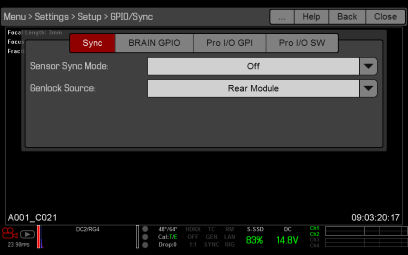
Figure: Select Rear Module
-
-
If the video feed is delayed, set the genlock offset. For more information, go to Set Genlock Offset.
Set Genlock Offset
If the video feed is delayed, adjust the genlock offset for the REDCAST Module.
-
Go to one of the following menus:
-
Menu > Settings > Display > REDCAST
-
Menu > Settings > Display > Monitor Control > Advanced > REDCAST
-
-
Select the genlock offset from the Genlock drop-down menu. Range is –8,000 pixels to 10 pixels. Default is 0 pixels.
-
Negative offset: Advances the video, so the video reaches the switcher earlier than it would otherwise.
-
Positive offset: Delays the video, so the video reaches the switcher later than it would otherwise.
-
-
Continue to adjust the genlock offset until the video ingest equipment indicates that the video signal aligns with the genlock signal.
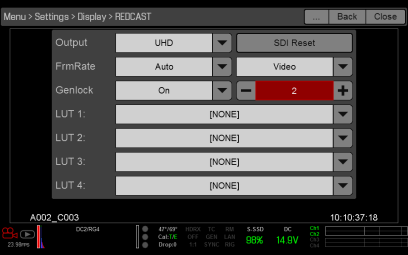
Figure: Select the Genlock Offset